Magazine Page Canva Templates: Your Shortcut to Polished Branding
There is a specific kind of frustration that hits when you realize your brand’s visual materials look disjointed. Your social media graphics scream one thing, your newsletter whispers another, and that lead magnet you spent weeks on feels like an afterthought. Consistency is the foundation of brand identity, yet achieving it often requires design skills or budgets that aren't always available. This is where the Magazine Page Canva Templates step in, offering a bridge between amateur efforts and professional editorial design. These aren't just static files; they are a versatile resource designed to unify your brand voice across multiple touchpoints, allowing you to mix, match, and customize without starting from a blank canvas.
The Anatomy of a Versatile Template
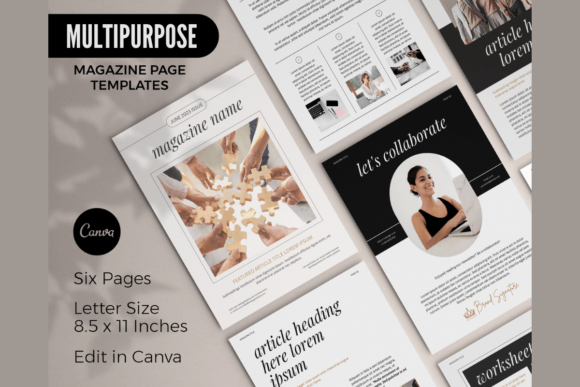
When we talk about Magazine Page Canva Templates, we aren't just discussing a collection of pretty boxes. We are talking about a structural framework built on an 8.5" x 11" canvas. This specific dimension is crucial because it mimics the standard US Letter size, making it instantly recognizable to audiences and easily printable for physical distribution. The visual personality of these templates tends to lean toward modern typography—clean lines, ample white space, and a focus on visual hierarchy. They act as a container for your content, utilizing a mix of serif and sans-serif font pairings to create a rhythm that guides the reader's eye naturally from headlines to body text.
The "personality" of the template is ultimately defined by you. Because the resource is fully customizable, it acts as a chameleon. A blogger might use the layout to create a lookbook filled with script fonts and handwritten elements to evoke warmth and authenticity. Conversely, a corporate consultant could strip away the decorative elements to utilize a stark, high-contrast display font for a serious financial report. The strength of the design lies in its neutrality and structure. It provides the grid system and the spacing—the invisible architecture that makes design look "expensive"—so you can focus on the creative font choices and imagery that define your specific niche.
Practical Applications: Beyond the Digital Magazine
While the name suggests a singular use case, the utility of these assets extends far beyond a digital flip-book. The six-page structure is perfect for creating a brief lead magnet. If you are a coach or consultant, a six-page PDF is the ideal length for a "cheat sheet" or a "quick start guide." It provides enough room to establish authority without overwhelming the reader. The templates allow you to maintain brand consistency, ensuring that the font pairings used in your lead magnet match the header of your website, reinforcing recognition.
Furthermore, these layouts serve as excellent starting points for simple newsletters. Email marketing often suffers from cluttered designs that render poorly on mobile devices. By designing your newsletter content within the 8.5" x 11" constraints of the Canva template, you are forced to prioritize content and visual hierarchy. You can export these pages as images or PDFs to embed in your email campaigns, ensuring that your typography and layout remain exactly as you intended, regardless of the subscriber's email client.
For the crafters and hobbyists in the audience, consider using these templates for quick workbooks. Whether you are teaching a watercolor technique or outlining a fitness routine, the printable nature of the file allows you to create tangible goods. You can incorporate stock photos provided within Canva to illustrate steps, using the layout to balance imagery with instructional text. The versatility means you aren't locked into a "magazine" aesthetic; you can strip it down to a minimalist instructional guide or build it up into a rich, visual portfolio.
Strategic Design and Brand Perception
Choosing to use a premium font or a high-quality template is rarely just about aesthetics; it is about psychology. When a potential client opens a PDF that utilizes poor spacing, mismatched typefaces, or low-resolution graphics, it subconsciously signals a lack of professionalism. Conversely, when they encounter a document that uses a deliberate font pairing—perhaps a bold serif for authority combined with a clean sans-serif for readability—it builds trust. It suggests that the business owner pays attention to details.
However, readability must always take precedence over style. A common pitfall in editorial design is the selection of a creative font that looks stunning in a headline but becomes illegible in paragraph text. When customizing your Magazine Page Canva Templates, pay close attention to the leading (line spacing) and tracking. If you choose a heavy display font for your headers, ensure the body text is a lighter weight sans-serif to create contrast. The goal is to create a visual hierarchy that allows the reader to scan the page effortlessly. The template provides the structure, but you must ensure your specific content choices enhance, rather than hinder, the reading experience.
Customization and Workflow Tips
To get the most out of this resource, you need a free Canva account, but you also need a strategy. Before you dive in, gather your brand assets: your logo, your specific hex color codes, and the fonts you already use. The goal is not to create a standalone magazine that looks different from your website; the goal is to create a seamless extension of your existing brand identity.
Start by swapping out the placeholder images. The templates utilize stock photos from Canva’s library, which are high-quality, but they are generic. Replace them with your own product shots or headshots to inject personality. Next, address the typography. If the template uses a handwritten font that doesn't fit your corporate vibe, swap it for a standard sans-serif. If you want to introduce a script font, use it sparingly—perhaps only for pull quotes or section dividers—to maintain that professional look.
Finally, remember that this is an instant download digital file. The barrier to entry is low, but the value you derive depends on the effort you put into customization. Mix and match pages from different variations if you have them. Take a cover layout from one set and combine it with a text-heavy layout from another. This flexibility is the true power of modular design assets. By treating these templates as a starting point rather than a finished product, you can produce high-quality, commercial-ready materials that elevate your brand and engage your audience effectively.