Travelo: A Googleslide Template for Modern Storytelling
When you're pitching a new travel brand, showcasing a photography portfolio, or presenting a corporate strategy that needs a touch of adventure, the visual foundation of your slides matters. It sets the tone before you even speak. This is where Travelo - Travel Googleslide Templates enters the conversation. It’s not just a collection of slides; it's a structured visual system designed to help you communicate with clarity and style. Built on a foundation of modern typography and clean design, Travelo offers a professional canvas that adapts to a wide range of creative and commercial needs.
Understanding the Visual Language of Travelo
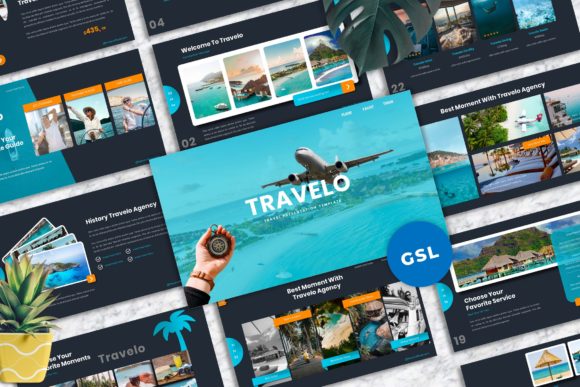
At its core, Travelo presents a balanced aesthetic. It avoids overly ornate or trendy styles that might date quickly, instead opting for a timeless, professional look. The template leverages a strong typographic hierarchy, using a combination of serif and sans serif fonts to create clear distinctions between headlines, subheads, and body text. This isn't just about looking good; it’s about readability. Your audience can quickly scan a slide and grasp the main point, followed by supporting details. The visual personality is one of organized confidence—clean lines, ample white space, and a logical flow that guides the viewer’s eye naturally from one element to the next.
The 16:9 widescreen ratio is standard for modern displays and projectors, ensuring your presentation looks crisp and fills the screen without awkward letterboxing. But the real strength lies in its 40 master slide layouts. Think of these as pre-built frameworks for different types of content: a bold title slide, a detailed data comparison, a team introduction, a project timeline, or a full-bleed image showcase. This variety means you’re not forcing your content into a one-size-fits-all mold. Instead, you’re selecting the most effective layout to deliver your specific message, which is a fundamental principle of strong editorial design.
Practical Applications Beyond Travel
While the name suggests a travel focus, the template's utility is far broader. Its clean, professional structure makes it a versatile design asset for numerous projects. A creative agency can use it to pitch a new campaign, maintaining brand identity consistency with its easy color change feature. An entrepreneur can craft a compelling investor deck, using the unique mockup device slides to showcase a mobile app or website interface in a realistic context. For small business owners, it provides a polished way to present annual reports, product launches, or workshop materials without needing a dedicated designer for every slide.
Content creators and bloggers will find it particularly useful for crafting media kits or sponsorship proposals. The picture placeholder and drag-and-drop functionality allow you to seamlessly integrate your own photography or graphics, making the presentation authentically yours. The inclusion of vector-based icons is another practical touch, ensuring your graphics remain sharp at any size and can be easily recolored to match your palette. This focus on editable, resizable elements respects the reality that most users need to customize templates deeply, not just superficially.
Making It Work for Your Project
Choosing a presentation template is a practical decision. Start by evaluating your project's core need. Is it about visual storytelling with heavy imagery? Travelo’s layouts with large image placeholders are ideal. Is it data-driven, requiring charts and lists? The structured data slides provide a clear framework. The key is to match the template’s strengths to your content requirements.
When you begin customizing, think about font pairing and color psychology. The documentation file will specify the free web fonts used, which you should install to maintain the intended design integrity. While the template allows for easy color changes, choose a palette that reflects your brand’s personality—whether it’s energetic and vibrant or calm and authoritative. Test your chosen colors for sufficient contrast, especially for text against background images or colored boxes, to ensure accessibility and readability for all viewers.
Remember, a template is a starting point. The most effective presentations feel cohesive. Use the master slides consistently. If you introduce a particular style of quote slide, use it for all quotes throughout. This consistency builds a visual rhythm that feels professional and intentional, reinforcing your brand identity and making your message more memorable. The goal is not to use every single layout provided, but to select and adapt the ones that best serve the narrative you’re building for your audience.
Final Thoughts on a Cohesive Presentation Toolkit
Travelo - Travel Googleslide Templates functions as a comprehensive toolkit. It acknowledges that a successful presentation is a blend of compelling content and thoughtful design. By providing a robust set of professionally designed, easily editable slides, it removes much of the initial friction in the design process. This allows you, whether you're a marketer, designer, or business owner, to focus your energy on the story you need to tell and the strategy you need to convey. The included documentation and font details demonstrate a commitment to user support, ensuring you can implement the template smoothly. In a landscape where visual communication is paramount, having a reliable, adaptable, and visually coherent template like Travelo is a practical asset for anyone looking to present their ideas with clarity and impact.